
The CHRO has a problem building with AI
Four walls you’ll hit building HR agents in Claude

What four builds taught us about where vibe-coding stops.
READ TIME: 7 MINUTES
We’ve spent the last few weeks building things.
An offboarding coordinator.
A PIP coordinator.
A recognition coordinator.
A comp cycle with a dashboard.
All real and built in an afternoon.
Those were about what vibe-coding gives you, and it gives you a lot. That’s the half that gets forwarded around. The problem is the other half.
Because while we were building, we kept hitting the same problems. Not bugs; you can prompt your way around. Structural limits, the kind that don’t move no matter how you phrase the ask.
Four builds in, we met the same set every time. Different tools, same walls.
They stay invisible while you’re building. They only surface the moment you try to hand the thing to somebody else.
So no build today.
Just the map of where it stops, why, and what you can reasonably do about it.
Read on.
Problem 1: It barely touches your real business data
The easy agents are easy because they don’t need any.
Onboarding, offboarding. You type in the person who just got hired or terminated, walk the steps, and done. That’s the sweet spot for vibe-coding, and it’s where you should start.
It also barely touches the limits.
Then you try something real.
Performance review.
People analytics.
Board and executive reporting.
Now the tool needs far more than what you type into it. It needs your roster, your comp data, your finance numbers, budget and actuals, plus performance records, attrition, and terminated employee history.
Two different problems hide in that sentence.
Separate them, because the first one lulls you.
Reading the file.
Claude does this well. Excel, CSV, Google Sheet, even plain TXT. Hand it over and it reads it, ties it to your bands, flags what won’t reconcile.
That’s the comp cycle build. It works.
But reading a file is not the same as running on it.
A real HR tool doesn’t read your export. It maps it. Every column lands on a defined field in the tool’s own data model. Employee ID to employee ID. Level to level. Rating to rating. So the number sits in the same place and means the same thing next month and the month after.
That mapping is the tool.
It’s also exactly what a vibe-coded app doesn’t have.
So what you actually built is something that can look at one fi, just oncece. Change a column header, add a location, and re-export next quarter with two extra fields, and it has no idea what it’s looking at.
Here’s the trap worth naming out loud. It works in the demo.
The demo may be the only place it works.
Connecting to the system.
Different problem, and a bigger one. A real people analytics tool isn’t reading files anyway. It’s connected to your HRIS or HCM, all the time, with nobody in the middle.
That connection runs through an API. An API needs a backend service.
This is where people misread the wall. Claude will write that backend. The service, the database, the login layer. It writes it, and the code usually looks right.
Writing it is a fraction of the job.
That code has to be reviewed by someone who can actually read it. Debugged. Wired into the app on both ends, configured, and deployed onto a server that stays up.
That’s a standard engineering process. Front-end and back-end people working against each other’s changes. Claude does not run that process on its own.
Then the long part starts. Patches. Version upgrades. The schema change nobody documented. The server bill. The outage on a Tuesday morning.
Backend is a different animal from front-end work. The code isn’t harder to produce. Somebody has to own it, forever.
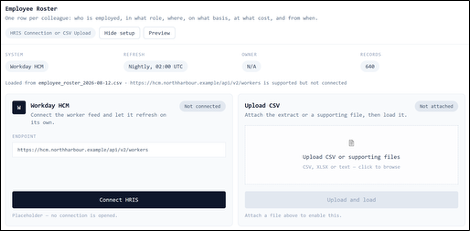
The best you can do is leave a connection point, like the one below. A placeholder in your app to import a file or link to an external system.
Wiring it up belongs to your engineering team.
Hopefully you have one.
Problem 2: The features you assume are there, aren’t
A workflow is never just the workflow.
Even in something as simple as onboarding, you need the new hire to sign agreements, protocols, and legal documents. Offboarding, same.
Move up to performance review or people analytics, and you want to attach files, display pictures, and embed a third-party tool.
Most of that you can’t do in an agent you vibe-coded.
Two halves to this one, and they fail differently.
Reaching out to other tools.
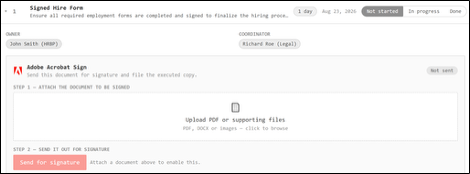
Connecting to something like Adobe Sign means a direct connection between Claude and that app. The common ones are there. Mail, calendar, drive, chat, and DocuSign for signature.
Whether the tool your company already pays for is on that list is another question. Often the answer is no.
But there’s a bigger catch, and it’s easy to walk straight past.
You don’t use a connector to work alone. You use it to reach somebody else. Send the offer out. Route the doc for signature. Ping the hiring manager.
So the question isn’t whether Claude can send it. It’s what the person on the other end sees when it lands.
Does that mail take them to the one thing you meant them to see, or to everything sitting next to it? Are they signing the document you chose, or looking at the folder it came out of?
That’s access control. It isn’t a connector feature and no connector gives it to you.
Hold that thought. It’s the same wall as point three.
Holding on to what comes back.
What you vibe-code is mostly the front end. The design, the UI, the workflow, the dynamics.
It can now remember what you typed into it between sessions, which is enough to keep a tracker from resetting every time you open it.
What it can’t hold is a file.
Go back to the signature you just routed out. It comes back signed, and it lands in the e-signature vendor’s system, not in your app.
Your tool can carry a note saying it was signed. It cannot carry the signed PDF.
Same for the photo on a recognition card. The doctor’s note on a leave case. The resume on a req.
Anything you upload has to live somewhere. Cloud storage, or backend storage the service provides. Without that, nothing in your app is a document of record.
For most HR files, the record is the entire point.
Same as the last point. You can leave the endpoint. Adobe Sign at the offer step, an attachment at the review step. Making it actually work takes backend support from professional engineers.
Problem 3: You can share it, but you can’t control who sees what
The other job a backend does is authentication and user management.
Also not available to you here.
Most HR work isn’t solo. Onboarding sits in your row, but the workflow pulls in Legal, Finance, and IT.
Board and executive reporting runs through your supervisor, your director, and sometimes the CHRO. Then it ends up in front of executives and the board.
You need access set accurately and safely, so everyone sees what they should and nobody sees what they shouldn’t.
Here’s the thing. Once vibe-coded, that app is built for you. It holds your data and your input, and that’s it.
You can share it. What you can’t do is control who sees what.
Open it up and everyone who opens it sees everything in it. Every salary. Every PIP note.
For a team checklist that’s fine. For anything HR actually guards, that’s not a feature. That’s an incident.
And if the work needs an approval flow, a preset sequence you and your supervisor have to move through in order, that’s out of reach too.
Collaboration. Simultaneous access. Permissions. Operation logs. Audit trail.
All of it sits on a backend. Without one, the tool is yours alone.
Problem 4: The living agent: maintenance, cost, and security
You don’t build an HR tool to use once.
Onboarding, offboarding, people analytics, benefits, and comp review. It’s all repeat work. So the tool has to be maintained. It has to stay in Claude and hold what you’ve put into it.
And it has to live in the AI environment. An agent built in Claude runs in Claude. Outside it, it does nothing.
Good news. That part works today. Keep it in Cowork or a project, and it’s there tomorrow, with the same files and the same rules. No backend needed.
The concerns are cost and security.
Cost.
Claude runs on a plan. Your session usage resets on a rolling five-hour window, with a weekly limit on top that resets at a fixed day and time assigned to your account.
That pool is shared across everything you do in Claude, not per tool.
If your app does heavy analysis or research, comp planning, or where it goes out looking for market benchmarks, say, it burns through far faster than normal use.
I’ve hit the ceiling mid-build more than once.
Weigh the maintenance cost against the advantage and the hours the tool actually saves you.
Security.
Most HR tools handle sensitive, sometimes confidential, employee data. So make it your first question, not your last. Is it safe to put this in Claude?
And be precise about what “this” is.
It isn’t your data. It’s your people’s. Base salary and comp history. Performance ratings and PIP notes. Medical and accommodation details. Termination reasons.
The material you already hold under lock and key, and the material you’d have to disclose if it ever leaked.
So read what your plan actually does with the conversations you put that into. A personal plan and a company plan don’t treat it the same way.
The protections your security team assumes are in place mostly sit on the business tiers. That’s the part that catches people out, because the plan most of us buy ourselves isn’t one of them.
Some states are moving on how sensitive personal data can be handled with AI, and it’s moving fast enough that whatever I printed here would be stale by the time you build.
Follow your company’s AI policy on real employee data, and talk to Legal. If nobody at your company owns that policy yet, that’s your answer for now.
One more thing, on compliance
Every legal flag in these builds came out of Claude’s own research.
That includes the ones that sound authoritative, cite a statute, and are completely invented.
Treat every flag as a reason to go check, never as the answer.
Keep the agent on analysis and drafting. The moment a tool screens, scores, ranks or recommends a person, a human has to own the decision and Legal needs to see it first.
The app can tell you a risk might be there. Whether it is, and what to do about it, stays with you and your counsel.
The Bottom Line
With all of that, a vibe-coded HR agent still has a real advantage. For a simple process, with few people involved, ideally one person handling the whole thing.
It saves you the slog of searching, trying, negotiating, buying, and trialing a new HR tool. Instead, you get a nearly instant way to design, refine, and test something shaped to your exact use case.
The problems are the ones above. Limited connection to external data and third-party tools. Limited ingestion. Missing built-in features. No collaboration. And once real HR data is in play, cost and security don’t go away.
Two places it earns its keep.
A demo.
Show your internal team, or an outside vendor, exactly what you’re looking for and what the tool should do. It beats a slide every time.
Real use, when you’re the sole owner of a function. Lead HRBP, TA lead, benefits administrator, CHRO or Chief People Officer. The more concentrated the data and the sources you already own, the more fully you can put the agent to work.
Coming next
Everything in this issue was a simple workflow.
Since writing it, we’ve gotten bolder.
We’ve been pointing this at the hard stuff.
People analytics. Comp planning. Performance management. Sophisticated features and controls that only exist in premium SaaS tools, and exactly the kind this issue says you can’t vibe-code.
We wanted to find out how far the walls actually sit from where we assumed they were.
Some of what came back surprised us.
We’ll show you all of it over the next few letter.
What we built, what broke, and where the line really falls.
And that’s all for today.
See you on Sunday.
Advertise with The CHRO Office.
I’m Warren Wang, CEO at Doublefin.com | Ex-Google | Ex-Microsoft | Helping HR advocate for its seat at the table.

Find me on LinkedIn